
Affiliate Disclosure: StreamCastSport.com is a participant in the Amazon Services LLC Associates Program, an affiliate advertising program designed to provide a means for sites to earn advertising fees by advertising and linking to Amazon.com. As an Amazon Associate, we earn from qualifying purchases.
If you watch a lot of live sports, having the right streaming device can make almost as much difference as choosing the right streaming service.
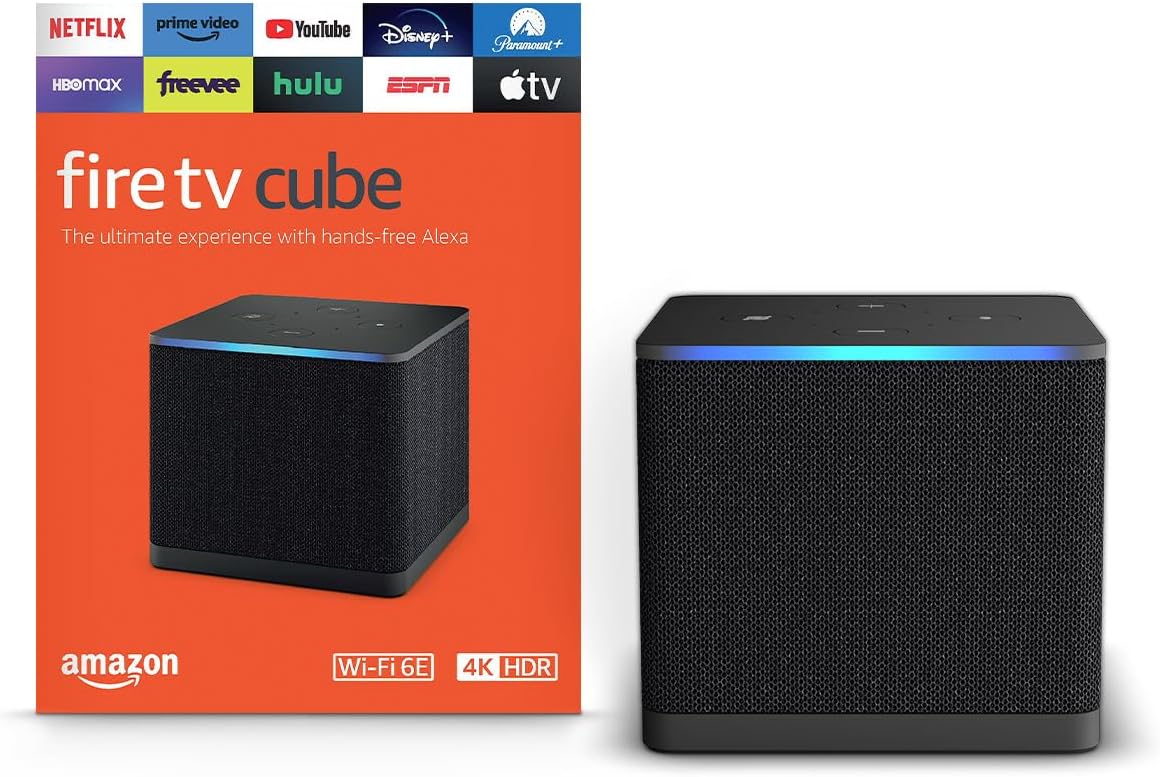
The Amazon Fire TV Cube combines 4K Ultra HD streaming, Wi-Fi 6E, hands-free Alexa voice control, an octa-core processor, and Amazon’s increasingly AI-powered Fire TV experience in one compact streaming device.
For sports fans who regularly jump between football, basketball, baseball, hockey, college sports, combat sports, and other live events, those features make the Fire TV Cube one of the more compelling premium streaming devices to consider.
Check the Amazon Fire TV Cube price and availability on Amazon →
Amazon Fire TV Cube at a Glance
The third-generation Fire TV Cube is designed as Amazon’s high-performance Fire TV streaming device. Instead of simply adding streaming apps to your television, it is intended to become the center of a connected home entertainment setup.
Key features include:
4K Ultra HD streaming at up to 60 fps
Wi-Fi 6E connectivity
Octa-core processor
Hands-free Alexa voice control
16 GB internal storage
HDR10 and HDR10+ support
Dolby Vision support
HLG support
Bluetooth 5.0
HDMI input for compatible external devices
Ethernet connectivity
AI-enhanced Fire TV and Alexa features
For someone primarily interested in streaming live sports in 4K, the combination of performance, connectivity, picture-format support, and voice controls is particularly attractive.
Why the Fire TV Cube Makes Sense for Sports Streaming
Sports streaming places different demands on a streaming setup than casually watching an episode of a TV show.
When kickoff is approaching, the last thing you want to do is spend several minutes navigating menus and searching through apps.
The Fire TV Cube’s hands-free Alexa integration is therefore more than a novelty.
You can use voice commands to navigate compatible Fire TV functions and entertainment without constantly reaching for the remote.
That can be especially useful when your streaming setup contains multiple services.
Instead of thinking of the Fire TV Cube simply as another streaming player, sports fans can think of it as a central hub for their streaming setup.
See the Fire TV Cube on Amazon →
4K Ultra HD Makes the Fire TV Cube Ready for the Big Screen
If you’ve invested in a large 4K television for watching sports, pairing it with a capable streaming device makes sense.
The Fire TV Cube supports video playback up to 4K Ultra HD at 60 frames per second with compatible formats and content.
It also supports major HDR formats including Dolby Vision, HDR10, HDR10+, and HLG.
That’s important because sports are increasingly consumed on large 4K televisions where picture quality, motion and overall stream quality become much more noticeable.
Of course, actual resolution and picture quality depend on the streaming service, event, subscription tier, television, internet connection and whether the broadcaster offers the game in 4K.
The Fire TV Cube can’t turn an HD broadcast into a native 4K sports feed, but it gives you hardware capable of handling high-quality 4K streams when they are available.
Wi-Fi 6E Is a Major Advantage
A premium streaming device is only as useful as its network connection.
The Fire TV Cube supports Wi-Fi 6E, including access to the 6 GHz band when used with compatible networking equipment.
That can be particularly useful in homes filled with connected devices competing for bandwidth.
Live sports don’t give you the luxury of waiting for a stream to buffer. If you’re watching the final drive of a football game or the final seconds of a basketball matchup, stability matters.
Wi-Fi 6E doesn’t guarantee buffer-free streaming because your internet provider, router, network congestion and streaming service all affect performance. However, having modern wireless hardware gives the Fire TV Cube a strong foundation for high-bandwidth streaming.
And if you prefer a wired connection, the Cube also includes Ethernet connectivity.
Fire TV Cube Performance
Under the hood, the third-generation Fire TV Cube uses an octa-core processor.
Amazon describes it as its fastest-ever 4K streaming media player, with significantly more processing power than some Fire TV Stick models.
That additional performance can translate into a smoother experience when opening applications, navigating menus and switching between streaming services.
For the casual viewer, shaving time off app navigation might not seem significant.
For a serious sports streamer who moves between multiple apps throughout a Saturday or Sunday of games, it can matter considerably more.
Hands-Free Alexa Is One of the Cube’s Biggest Features
One of the defining differences between the Fire TV Cube and a traditional streaming stick is far-field hands-free Alexa control.
The Cube includes a microphone array that allows Alexa voice control without requiring you to hold the remote every time you want to issue a compatible command.
This gives the Fire TV Cube more of a home-entertainment-hub feel than a conventional streaming dongle.
Amazon has also continued expanding Alexa+ and AI-powered entertainment discovery across its ecosystem.
For viewers overwhelmed by the amount of content available across modern streaming services, conversational search and discovery could become increasingly useful.
Instead of endlessly scrolling through menus, the goal is to make finding something to watch more conversational.
Streaming Sports Apps on Fire TV
The Fire TV ecosystem provides access to a broad selection of streaming applications, making the Cube useful for sports fans who subscribe to multiple services.
Depending on current app availability, subscription plans and your location, your Fire TV setup may include services carrying:
NFL games
College football
NBA basketball
MLB baseball
NHL hockey
Soccer
UFC and combat sports
Golf
Tennis
Motorsports
College basketball
Sports documentaries and studio programming
Always verify that the specific service and package you are considering carries the teams, leagues and events you want before subscribing.
Fire TV Cube vs. Fire TV Stick: Which Is Better for Sports?
For many people, a Fire TV Stick is perfectly adequate.
The Fire TV Cube is aimed at viewers who want a more powerful and feature-rich Fire TV setup.
A Fire TV Stick may make more sense if your priority is:
Lower upfront cost
Basic streaming
A small device hidden behind the television
Occasional rather than heavy streaming
The Fire TV Cube becomes more compelling if your priorities include:
Faster hardware
Wi-Fi 6E
Hands-free Alexa
4K sports streaming
A premium home theater setup
HDMI input connectivity
Controlling compatible entertainment equipment
Frequently switching between streaming services
For someone building a dedicated sports-streaming setup around a large 4K TV, we’d lean toward the Fire TV Cube.
Check today’s Fire TV Cube price on Amazon →
Fire TV Cube Pros and Cons
Pros
Fast performance: The octa-core processor makes the Cube one of the higher-performance options in Amazon’s Fire TV lineup.
Excellent 4K support: 4K at up to 60 fps plus Dolby Vision, HDR10, HDR10+ and HLG provides extensive format support.
Wi-Fi 6E: Modern wireless connectivity is particularly valuable for high-bandwidth streaming.
Hands-free Alexa: Control compatible functions without constantly reaching for your remote.
Great for multi-app sports households: Particularly appealing if your sports viewing is spread across several streaming platforms.
HDMI input: Compatible external devices can become part of the Fire TV Cube entertainment setup.
Cons
More expensive than a Fire TV Stick: Casual streamers may not need the additional hardware.
4K availability varies: Owning a 4K streaming device doesn’t mean every game or streaming service will be available in native 4K.
Best features require compatible equipment: Wi-Fi 6E, HDR and Dolby Vision benefits depend on the rest of your setup.
Streaming subscriptions are separate: Purchasing the Fire TV Cube doesn’t include every sports streaming service or premium sports package.
Who Should Buy the Amazon Fire TV Cube?
The Fire TV Cube makes the most sense for someone who wants more than the cheapest way to put streaming apps on a television.
We think it’s particularly well suited for:
Dedicated sports fans who spend hours streaming live games every week.
Cord-cutters who rely heavily on streaming services instead of traditional cable or satellite TV.
4K TV owners who want hardware capable of taking advantage of a premium display.
Alexa households already using Amazon’s smart-home ecosystem.
Home theater enthusiasts looking for a more capable Fire TV device.
Multi-service subscribers who regularly jump between streaming platforms to find different games.
If you only stream occasionally on a smaller television, a less expensive Fire TV device could be enough.
But if your television is the center of your sports-watching setup, the Fire TV Cube’s additional performance and features become easier to justify.
Is the Amazon Fire TV Cube Worth It in 2026?
For the right viewer, yes.
The Amazon Fire TV Cube combines the features we want to see in a premium sports-streaming device: 4K support, Wi-Fi 6E, powerful processing, hands-free voice controls, HDR format support and deep integration with the Fire TV ecosystem.
Its biggest drawback is straightforward: you pay more than you would for a basic streaming stick.
But that’s also why comparing the Cube solely to an inexpensive streaming stick misses the point.
The Fire TV Cube is better suited to someone building a complete entertainment setup around streaming.
If you’re regularly watching NFL Sundays, college football Saturdays, NBA games, baseball, hockey, soccer or other live sports through streaming services, the Cube’s speed and connectivity could make it a worthwhile upgrade.
Our Verdict
Best for: Serious sports streamers, cord-cutters, Alexa users and 4K home theater setups.
Skip it if: You only need inexpensive basic streaming and don’t care about hands-free Alexa, Wi-Fi 6E or the Cube’s additional performance.
StreamCastSport Rating: 9/10
For viewers who want a premium Fire TV experience rather than simply the cheapest streaming device available, the Amazon Fire TV Cube is one of the strongest options to consider for a sports-focused streaming setup in 2026.
Check the latest Amazon Fire TV Cube price and availability →
Prices and availability can change. Check Amazon for current pricing, product details and availability.
Frequently Asked Questions
Is the Fire TV Cube good for live sports?
Yes. Its combination of fast hardware, 4K support, Wi-Fi 6E and access to Fire TV streaming applications makes it well suited to live sports streaming. The specific games available depend on the streaming services and subscriptions you use.
Does the Fire TV Cube support 4K sports?
The Fire TV Cube supports 4K Ultra HD video at up to 60 fps. Whether an individual sporting event is actually available in 4K depends on the broadcaster and streaming provider.
Does the Fire TV Cube have Wi-Fi 6E?
Yes. The third-generation Fire TV Cube supports Wi-Fi 6E, including compatible 6 GHz networks.
Can you use Alexa without touching the Fire TV remote?
Yes. The Fire TV Cube supports far-field, hands-free Alexa voice control.
Does Fire TV Cube support Dolby Vision?
Yes. The third-generation Fire TV Cube supports Dolby Vision as well as HDR10, HDR10+ and HLG.
Is Fire TV Cube better than Fire TV Stick for sports?
It depends on your setup. A Fire TV Stick can be an excellent lower-cost option. The Cube makes more sense for viewers who value additional processing power, Wi-Fi 6E, hands-free Alexa and expanded home-entertainment functionality.
Do you need Amazon Prime to use Fire TV Cube?
You can use the Fire TV platform with many different apps and services, although individual streaming services may require their own subscriptions. Prime membership and Prime Video benefits are separate considerations.
What internet speed do I need for 4K sports streaming?
Requirements vary by streaming provider. A fast and stable connection is particularly important for live 4K streaming, and you should follow the internet-speed recommendations of the service carrying the event.